
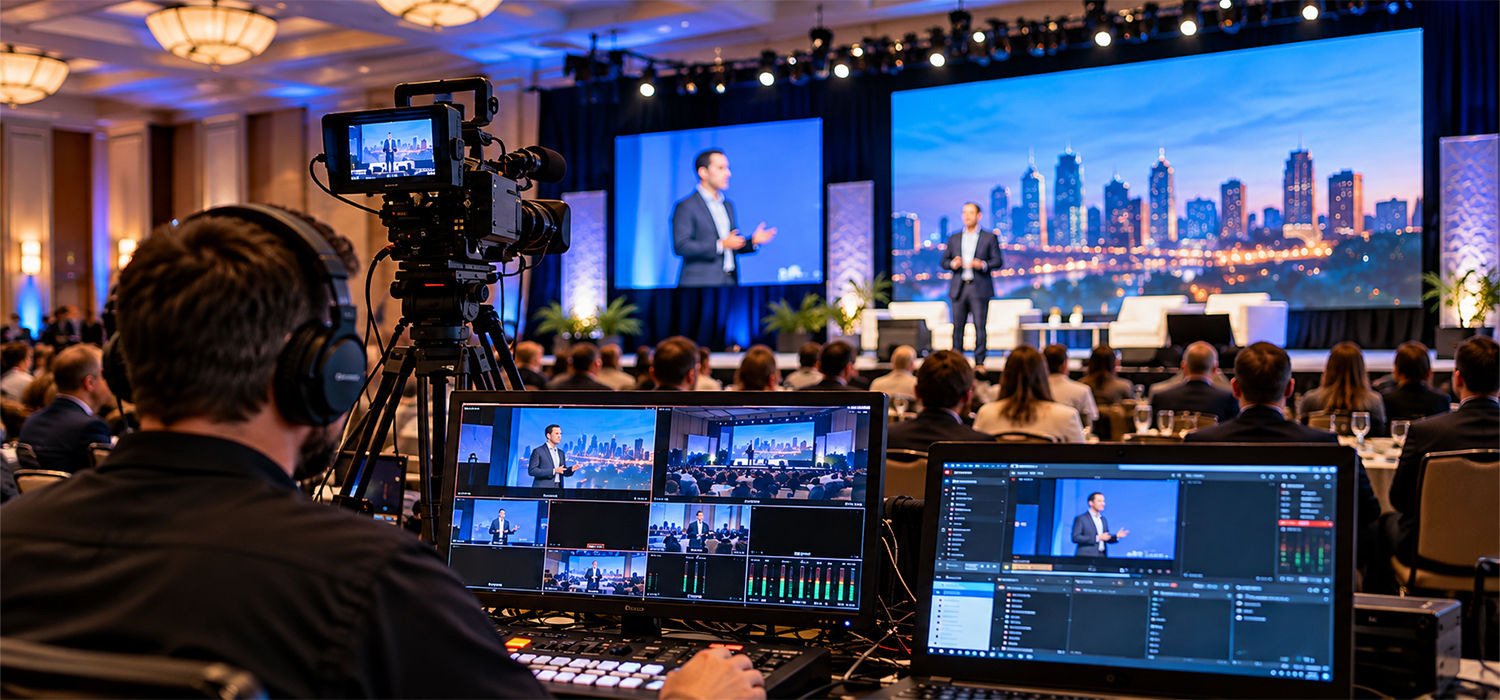
A successful event consists of clear strategic goals, very careful and precise logistical planning and making sure people are engaging well enough that it will deliver measurable value for your business, then it will be defined as a great event and the crucial part of any great event is how you showcase it, not everyone will able to attend the event in person and they would want to see it from their phones, television and other platforms so our live event broadcasting service helps users enable that, so they can never miss the important parts of any event. Conference live streaming is now a game-changer, allowing companies to live stream a conference and reach a global audience in real time. With advanced live streaming events, businesses can engage more attendees than ever before, breaking geographical barriers and maximizing participation. This transformation ensures that future events remain accessible, interactive, and cost-effective.
Why do you need to live stream a corporate event?
Live streaming a corporate event can be much more than simply broadcasting it out to a wider audience. It can serve as a means for people who are not present at the event to experience things like presentations, discussions, and announcements as they happen. In Kansas City, professional corporate livestreaming a professional corporate livestream involves a step-by-step production workflow, which includes experienced production crews, multi-camera equipment, and advanced live video production technologies in order to achieve the necessary level of quality and ensure that everything goes according to the production plan.
Step-by-Step Production Workflow
A successful livestream starts with careful planning and coordination. The workflow covers equipment preparation, camera positioning, audio setup, speaker transitions, presentation integration, live switching, and broadcast management from setup through the end of the event.
Professional Production Crew
An experienced production team manages the technical side of the broadcast on-site. This can include operating cameras, coordinating audio, managing live feeds, handling presentations, and monitoring the stream throughout the event.
Multi-Camera Equipment
Professional live events can use multiple cameras to capture speakers, panel discussions, presentations, and audience activity from different angles. Camera feeds can be coordinated and switched in real time to create a more engaging viewing experience for people watching remotely.
Real-Time Broadcast Technology
Live streaming combines camera feeds, audio, graphics, switching, and streaming technology into one coordinated production. Proper technical management helps deliver a polished, broadcast-ready experience to the online audience.
Event Photography & Videography
Alongside the livestream, professional photography and videography can capture key moments from the event for promotional content, social media, recap videos, and future marketing use.
According to Business Research Insights, there was 27% growth in the corporate webinars and live events in the period of 2023-2025. The growth indicates that there has been an industry-wide trend towards hybrid working, where both remote and onsite employees should receive the same information.
There are several practical reasons organizations choose to live stream:
Wider Reach
Remote employees, other offices, and traveling staff can watch the same event live, rather than waiting for a recap or recording afterward.
Real-Time Engagement
Live chat and Q&A features allow viewers to interact during the event, which is not possible with a pre-recorded video.
Consistency With Brand Standards
A well-produced live stream reflects the same production quality audiences expect from a company’s external marketing content.
Reusable Content
Once the event is over, a single live stream can be transformed into bite-sized videos, highlights, and recorded versions of the event to be accessed later on.
Which Platform Should You Use?
The right platform depends on the audience: YouTube works best for the public-facing events, LinkedIn Live for a professional or B2B audience, and private platforms for internal, invite-only events.
YouTube Live
YouTube Live is ideal for occasions like product launches and keynote talks. Viewers without accounts can still tune in. YouTube outperforms all other live video streaming services in total watch time, beating Twitch by about 35%, based on data from Stream Charts.
LinkedIn Live
LinkedIn Live is ideal for business-to-business audiences, executive interviews, or industry forums. Data from LinkedIn shows that live video on this channel generates 24 times the number of comments and seven times the number of reactions in comparison to regular posts.
Private or Password-Protected Platforms
Tools such as Vimeo or Zoom Webinar are suitable for conducting internal town halls, earnings calls, or other events that need to be kept discreet and not identifiable by the general public.
How to Livestream on YouTube
Livestreaming a corporate event on YouTube involves eight steps, from enabling the feature on a channel to broadcasting live to an audience.
Turn On Live Streaming
Not all YouTube channels will have live streaming feature enabled. In the YouTube Studio, navigate to “Go Live.” Follow the instructions to activate the feature.
Verify Your Channel
YouTube requires phone verification before a channel can stream. This is a one-time process and should be completed several days before the event, since verification can occasionally take time to process.
Set Up Your Camera and Sound
Audio quality has a greater impact on viewer retention than video quality. A dedicated microphone is recommended over a laptop’s built-in microphone, and camera framing and lighting should be tested in the actual event space rather than a separate rehearsal area.
Choose Your Streaming Method
A single-camera setup can use YouTube’s built-in streaming tool directly. When there are events with multiple cameras, slides, or graphics, encoder software such as OBS (Open Broadcaster Software) is used to combine these sources into one feed.
Add Your Stream Details
Prior to the live broadcasting, add a clear title and description, alongside choosing the relevant privacy setting, be it either public, unlisted, or private. In addition, when looking to schedule the live session beforehand, scheduling the stream in advance also generates a shareable link ahead of the event.
Do a Test Run
There must be a full rehearsal stream unlisted happening at least one day before the actual event. It will play the role of testing the audio levels, the alignment of the camera, the quality of the internet, and of course, the slides and graphics.
Have a Backup Plan
It is possible that the connection may fail even after being stable, so in that case try using a mobile hotspot instead, while being prepared to quickly switch to it if the connection is cut off. A short delay handled calmly is far less noticeable to viewers than a stream that cuts out with no recovery plan.
Go Live
The stream should begin a few minutes before the scheduled start time, often with a simple holding slide, so early viewers are not looking at a blank screen. Once live, monitoring chat activity and stream health is useful, though the event content remains the primary focus.
Where Can You Use the Livestream After?
A corporate livestream does not have to end when the event does — it can continue to serve as usable content for weeks or months afterward.
On-Demand Replays
Leaving the live stream available for later viewing on YouTube means that employees or customers in different time zones can watch it whenever they want.
Short Videos
Various key moments, quotes, or announcements may be turned into shorter videos that could be posted to platforms such as LinkedIn, Instagram, or a company newsletter.
Internal Training Resources
Recorded town halls and product briefings can serve as reference material for onboarding and future employee training.
Website and Landing Pages
Short video clips from an opening address or a product unveiling can be included in either the homepage or case study page, allowing visitors to have a direct glance at the business’s culture or products.
Conclusion
Corporate live streaming is no longer a niche technical exercise — it has become a standard part of how organizations communicate with employees, customers, and the public.
Factors, such as selecting a proper platform, testing connectivity, and preparing for the post-event content, are the key determinants of a successful live streaming event.
Whether it is a global town hall, a product launch or an executive keynote, the underlying goal remains the same: reaching an audience wherever they are watching from, with a broadcast that reflects the quality of the event itself.